Mobile Banking
Mobile Banking
The convenience of banking where and when you want.
Mobile check deposit, Franklin Bill Pay, transfer funds, and more. All within the safety of your own home.
The Franklin eBranch app is available FREE for iPhone®, iPad®, and Android® devices from the iTunes App Store or Google Play.
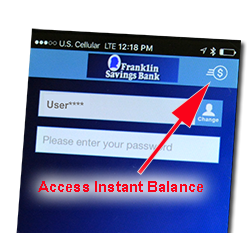
Franklin eBranch just got even better! We’ve upgraded our mobile app so you can view your balance instantly, without actually logging in. Your account numbers are masked, except for the last four digits, and you cannot complete transactions without logging in. To use Instant Balance, you must update your app at the Apple App Store or Google Play. Once updated, click the icon in the upper right corner of your log in screen to set up and access Instant Balance. You may choose up to six accounts to feature on this quick view list.
Frequently Asked Questions
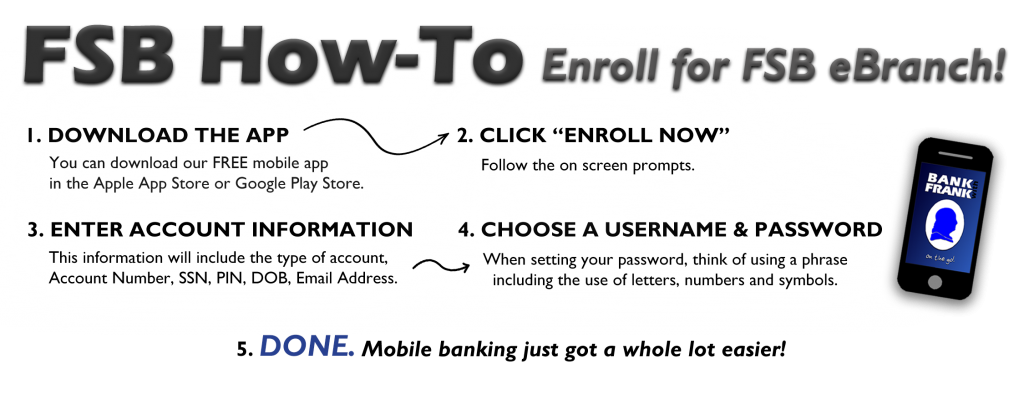
How do I enroll in Franklin eBranch?
Start by submitting the following information on our enrollment page.
- The account type of one of your accounts (checking, savings, certificate of deposit, or loan)
- The account number
- Your Social Security number
- Your Telebanker passcode or PIN; if you have not called Telebanker, your default passcode is the last four digits of your Social Security number
- Your date of birth
- Your primary email address
- Click Enroll.
- Agree to our terms and conditions.
- Select a username and password. Your username must be at least 6 characters, and your password must be between 8 and 17 characters and contain a letter and number.
- Select three challenge questions, and enter their answers. Indicate if you wish to be challenged in the future on the device in which you are currently enrolling.
- You will be prompted to enroll in Mobile Banking. If you are interested in setting up text alerts, this is where you would set them up; otherwise, you will be enrolled in Mobile Banking without proceeding with this step, and you may decline it.
- To learn how to enroll in Franklin eStatements click here.
How does Mobile Deposit work?
If you have an iPhone® or Android™ smartphone, simply download the Franklin eBranch On The Go! app. Then, log in. Simply key in the amount of the deposit, and take a picture of the front and back of the check. That’s all you need to do!
What types of checks can be processed through Mobile Deposit?
All personal and business U.S. checks can be processed through Mobile Deposit. Checks from Canada and other foreign countries, savings bonds and poor image quality checks must be deposited at your local Franklin Savings Bank.
How do I endorse my check?
Endorsements must be made on the back of the check. Your endorsement must include your signature and the wording “FOR MOBILE DEPOSIT ONLY.”
How secure is Mobile Deposit?
Mobile Deposit is very secure. It features multiple layers of security, giving your account and check data the highest level of safety available.
When can I make mobile deposits to Franklin Savings Bank?
You can transmit mobile deposits to Franklin Savings Bank 24-hours a day, 7-days a week including weekends and holidays, except for our routine maintenance downtime.
When will deposits be posted into my account?
Funds deposited using mobile deposit before 3pm will generally be made available the following business day from the day of deposit.
What should I do with the original paper checks after deposits are made?
Original checks should be stored for a minimum of thirty (30) days prior to being destroyed.
How do I prevent checks from being scanned and deposited twice?
The software has built-in duplicate detection tools that detect items already captured. If the software detects potential duplicate checks, an alert prompts you to make a decision about the items in question. Also, you must endorse the back of the check with “For Mobile Deposit Only” to prevent a duplicate deposit at a branch.
How do I know the image quality is acceptable?
The software has built-in duplicate detection tools that detect items already captured. If the software detects potential duplicate checks, an alert prompts you to make a decision about the items in question. Also, you must endorse the back of the check with “For Mobile Deposit Only” to prevent a duplicate deposit at a branch.
General Tips
- Before using into the mobile deposit function on your app, close all other apps running in the background on your mobile phone.
- Sign to endorse the back of your check, and label it “For Mobile Deposit Only.”
- When prompted for the amount, carefully enter the check amount to ensure it matches the amount written on your check.
- Flatten folded or crumpled checks before taking your photos.
- Choose a well-lit area to take the picture of your check and place the check on solid dark background before taking the photo of it.
- Frame your check within the view finder on the camera screen when capturing your photos. All four corners and the entire check image should be visible. Try not to get too much of the area surrounding the check.
- Keep your phone flat and steady above the check when taking your photos and make sure you are in focus. Hold the camera as square to the check as possible to reduce corner to corner skew.
- No shadows across the check
- Check must not be blurry
- The MICR line (numbers on the bottom of your check) must be readable.
- Please be aware, there is a $10,000.00 daily item limit and a total daily limit of $20,000.00
Franklin eBranch Text Banking
You can set up SMS banking through your profile under ‘Manage Devices’ in Franklin eBranch. This will enable you to text a limited number of commands to our short code: 99588
- The commands include:
- ‘HELP’ for help with commands
- ‘BAL’ for account balances
- ‘ATM’ + street or zip code for ATM locations nearest you
- ‘BRANCH’ + street or zip code for branch locations nearest you
- ‘HIST’ + texting nickname for transaction history of a particular account (ex: HIST C1; that’s transaction history for checking 1. If you do not have nicknames selected, the default texting nicknames are numbered 1 through however many accounts you have.)
With FSB Account Alerts, you can also set up alerts to send a text message or an email to you when a particular activity takes place with your account, such as an account balance target amount or a deposit or withdrawal posting to your account. At Franklin eBranch, select “Messages” box.
- Select “New” to set up an alert, or
- Select “Checking” (or “Savings” or “Loans”) to view alerts associated with your account(s)
To set up an alert, click “New” for the type of account you wish the alert for, checking, savings or loans.
Checking alert options are available for:
- Checks cleared
- Balance
- Debit or
- Deposit
Savings alert options are available for:
- Balance
- Deposit or
- Withdrawal
Loan alert options are available for:
- Advances or
- Payment
Please be aware, when you set up a text alert, you will need to use your 10-digit cell phone number. Some texts may be received in the middle of the night, depending on when files post to accounts.
Some debit card transactions will prompt two alerts to be sent. The first may be sent for any pre-authorization that the merchant posts and the second is sent when the actual transaction posts to the account.
FSB Account Alerts let you know what’s happening in your account while you’re away from Franklin eBranch.
Mobile deposit instructions
- Select Deposits from the menu
- Select New Deposit
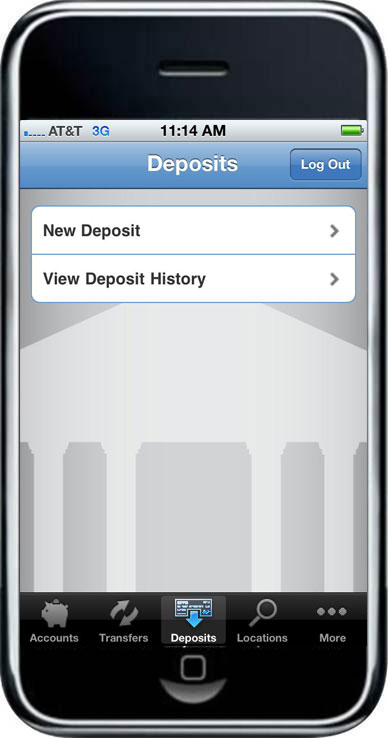
- Select the account to deposit funds
- Enter the deposit amount of the check
- Select Continue
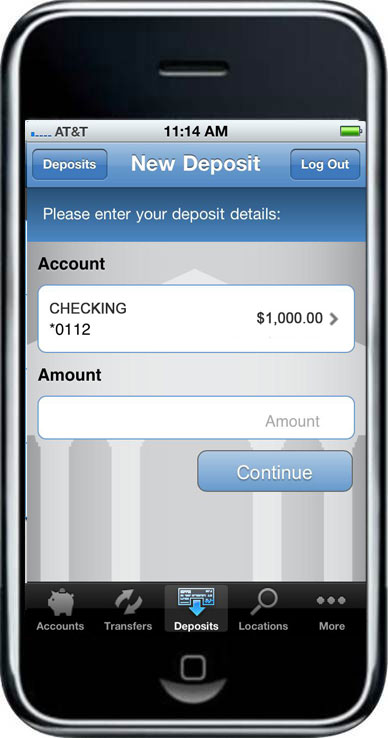
- You are prompted to take a photo of the front and back of the check
- After each image is taken, you will select Use Photo to send the image or Retake
- The images are uploaded and validated to ensure image quality and to validate that the back of the check has been endorsed
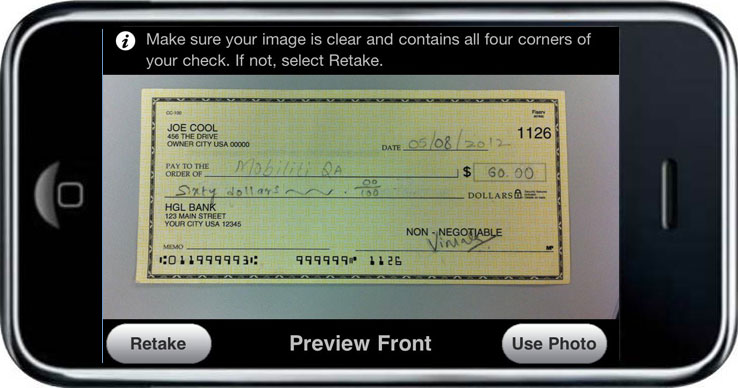
Real time tests are performed to:
- Verify it has not been deposited before via phone
- Read hand or machine printed amount from image
- Compare amount read from image to amount entered
Submit a deposit
Once user sends the image, they are prompted to confirm deposit amount.
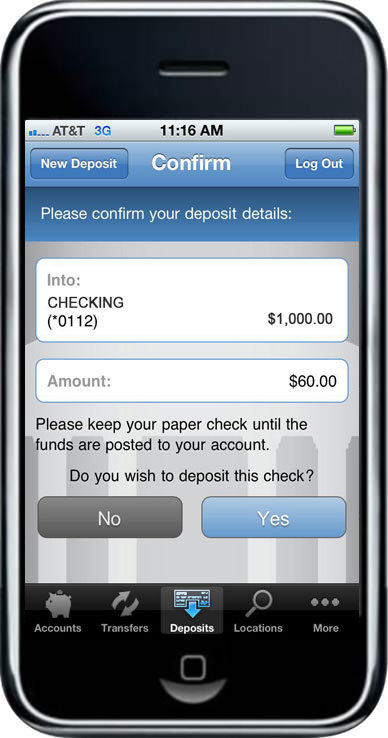
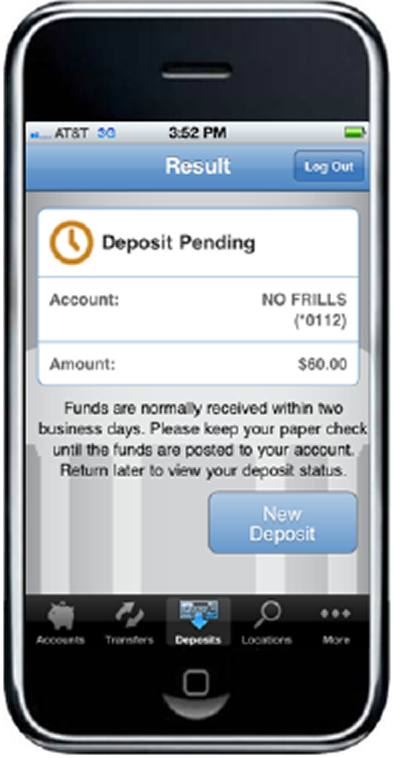
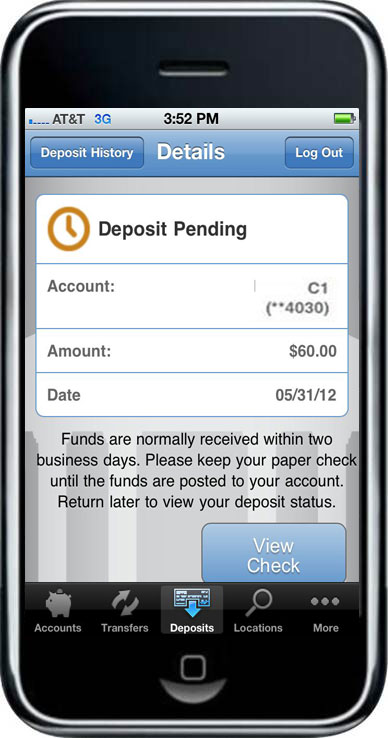
Deposit Pending
If the deposit passes all the real time tests, it is passed to Franklin Savings Bank for additional processing. Some deposits may be manually reviewed; for this reason, the deposit shows as Pending upon submission.
View Deposit History
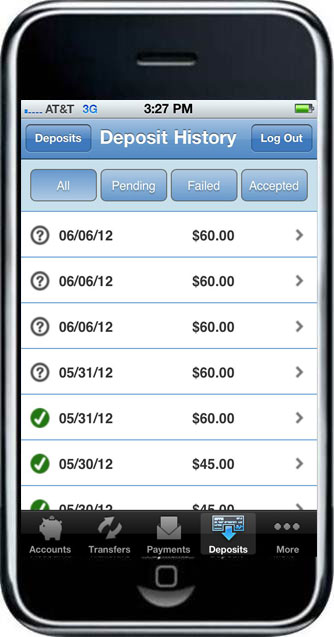
The history reflects the status of the check capture, not the posting of the check to your financial account. You are able to view 30 days of deposit history captured from your mobile device.
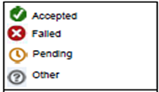
Click deposits to view more details
You may also click View Check to view the image
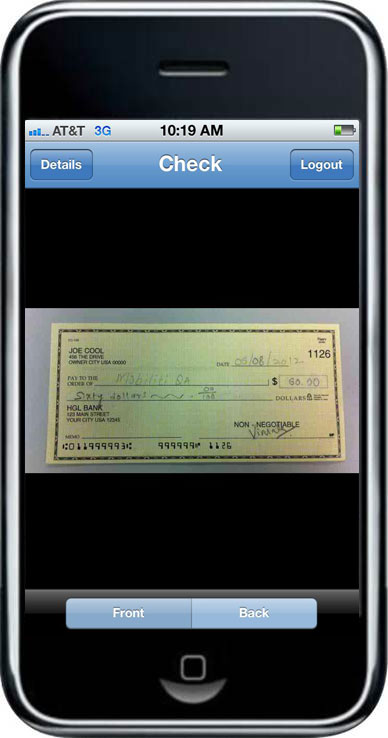
You can:
- View Details, Logout, View Front, view Back
Mobile banking security statement
Franklin Savings Bank is committed to protecting the security and confidentiality of your account information. As technology changes we will review and monitor our system to ensure your Franklin eBranch sessions are secure.
Franklin Savings Bank uses a monitored firewall and 128-bit encryption to safeguard your Franklin eBranch sessions. A firewall will refuse entry to anyone without proper authorization (Log in ID and Password). The firewall checks to make sure that communications only occur between two approved individuals. Encryption scrambles information as it is transmitted over the Internet to ensure your privacy and confidentiality. We require your browser to support 128-bit encryption.
Your Log in ID and Password serve as your unique personal access to Franklin eBranch. When you log in for the first time, you will be prompted to select a secure Access ID and password. We strongly recommend that you change your password often. Your password can contain no less than six characters and no more than 16, it must contain at least one (1) number and one (1) letter. As an added protection for you, your access to Franklin eBranch will be blocked in the event your password is entered incorrectly on three (3) consecutive attempts. If this occurs please telephone Franklin Savings Bank during regular banking hours (207) 778-3339 or toll-free at (800) 287-0752 to have your access reset.
Because your Log in ID and password can be used to access information about any of your accounts, you should treat your password with the same degree of care and secrecy that you use to protect other sensitive personal financial data. Do not give your password, or make it available, to any other person.
If you leave your computer unattended or move to an unsecured site or forget to exit when you have completed your secure Franklin eBranch session, we will automatically end your session after 15 minutes of inactivity. You cannot use your browser “back” button to return to a “logged in” status.
What can I do to protect my personal financial information on my computer and mobile phone?
Banks use a combination of safeguards to protect customer debit card data, which allows us to detect unusual spending patterns and protect accounts. But you, the customer, also play an important role in safeguarding your personal financial information on your computer and mobile device. Below are a few tips and suggestions to better keep your information secure and private.
- Install and keep updated anti-virus software, firewall and anti-spyware software. While some carriers preload AVS on smartphones, some do not. Ask your carrier about yours.
- Set your computer’s operating system and browser to “automatic download” to ensure your operating system and browser include the latest security updates.
- Do not respond to unsolicited emails requesting personal information and do not download attachments on unsolicited emails. We will never contact you by email asking for your password, PIN, or account information. Only open links and attachments from trusted sources.
- Be aware of smishing attacks (spoof text messages) with links to sites that download malicious software or install fraudulent apps on your smartphone. Remember, we won’t ask for sensitive information from you via text or email … EVER. We suggest you download Franklin eBranch On The Go! using the links directly from our website www.franklinsavings.bank.
- Watch your Bluetooth connection on your smartphone! While your Bluetooth can be handy for hands-free calling, you ought to close it when you are not using it and decline unexpected requests to pair, even if they appear to be from a familiar source. Regular paired devices won’t ask to connect. Bluesnarfing is when information is stolen from a wireless device through a Bluetooth connection. If you didn’t initiate it, don’t accept it.
- Use strong passwords and change them at least three times a year. The best passwords are long and complex, using at least 8 characters and incorporating a combination of numbers, symbols and letters. Avoid birthdays, pet names and simple passwords like 12345.
- Don’t share your passwords with family members. Friendly theft — theft by someone the victim knows — is the most common type of identity theft or fraud. Be mindful of who has access to your personal information.
- If you lose your mobile device, immediately contact Franklin Savings Bank so that we can suspend your Franklin eBranch On The Go! access on the lost device. We also suggest taking advantage of screen lock security, using a PIN, pattern, or facial/thumb recognition (not available on all devices) to better protect your sensitive information. Make sure to also contact your wireless provider.
- Continually monitor your accounts. Check account activity often, instead of waiting for the monthly statement. You are the first line of defense because you know right away if a transaction is fraudulent. If you notice unusual or unauthorized activity, notify your bank right away.
- Should you become a victim of identity theft, file a police report and call the fraud unit of the three credit-reporting companies. Consider placing a victim statement in your credit report and make sure to maintain a log of all the contacts you make with authorities regarding the matter. Write down names, titles, and phone numbers in case you need to re-contact them or refer to them in future correspondence.
- For more advice, contact the FTC’s ID Theft Consumer Response Center at 1-877-ID THEFT.
If you have questions or desire additional information about our security please contact the Security Officer at:
Franklin Savings Bank
PO Box 825, 197 Main Street
Farmington, ME 04938
(207) 778-3339 or toll-free (800) 287-0752
Contact Franklin Savings Bank